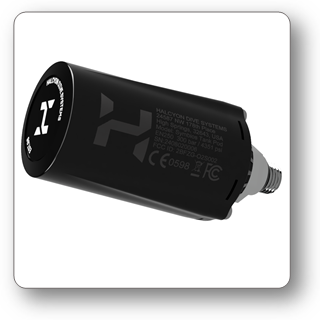
SYMBIOS Tank Pod
Welcome to the short manual for the SYMBIOS Tank Pod.
USPs
- Wireless tank pressure readout
- Innovative 125kHz magnetic transmission technology
- Integrated trim sensor (patented)
Introduction
Congratulations on purchasing your SYMBIOS TANK POD. The SYMBIOS TANK POD is an advanced, digital SPG for accurately measuring scuba tank gas pressure. The SYMBIOS TANK POD also includes a patented feature, allowing divers to measure their horizontal position in the water. This industry-leading feature allows divers to receive real-time feedback on their position, allowing them to identify how flat they are in the water. A flat, horizontal position develops less drag while swimming, reducing effort and gas consumption. This position also reduces the risk of damaging fragile corals. This data is transmitted, along with tank pressure to a Halcyon Symbios HUD or HANDSET. Information about the diver’s position is available on the CUSTOM FIELDS of the dive computer and displays as a negative or positive percentage from horizontal..
The SYMBIOS TANK POD, together with a compatible Halcyon dive computer, is classified as Personal Protective Equipment under the EU Regulation 2016/425 and protects against risks listed under PPE Risk Category III (a): substances and mixtures which are hazardous to health. Based on EU PPE Regulation 2016/425 Annex I, the SYMBIOS TANK POD is designed to protect the user from drowning (Category III (i)). The SYMBIOS TANK POD performs this function by transmitting tank pressure information to the user’s compatible dive computer, which allows the user to take the appropriate, life-saving action..
Backup instruments such as a depth gauge, submersible pressure gauge, timer, or watch, must be used in conjunction with the SYMBIOS TANK POD.
Features:
- High-resolution digital tank pressure sensor
- 3-axis accelerometer to measure the position of the diver (tilt)
- Sophisticated transmission protocol based on a 125 kHz magnetic carrier, which allows high data rates and short transmission packages, in order to avoid data collisions when multiple wireless devices are used simultaneously
- User replaceable CR123 Li Ion battery
Safety Considerations
Before using the SYMBIOS Tank Pod, please read and understand the information provided in this manual in its entirety. Be aware that diving has many inherent risks. A dive computer considerably increases diving safety, but it does not eliminate the remaining risk of serious injury or death caused by decompression sickness, oxygen toxicity, or other inherent risks of scuba diving.
You should not use this SYMBIOS Tank Pod if you are not aware of or if you do not accept those risks.
In this manual, the following three precautionary messages are used: WARNING, CAUTION, and NOTICE symbols provide users with necessary information about potential hazards and proper procedures.
 WARNING statements describe potentially hazardous situations which, if not avoided, could result in serious injury or even death.
 CAUTION indicates a hazardous situation which, if not avoided, could result in minor or moderate injury.
 NOTICE statements are used to provide important information regarding installation, operation, maintenance, performance, general important tips, or instructions for a procedure or situation that, if not performed properly, might cause damage to the device but is unrelated to physical injury.
- Before using the SYMBIOS Tank Pod, read the manual in its entirety to familiarize yourself with all of the functions of the device.
- Do not use SYMBIOS Tank Pod if it shows any signs of damage or malfunction. Contact HALCYON or an authorized repair center.
- Although the SYMBIOS TANK POD is extremely reliable, it could still fail. In such a case, there may be no or incorrect pressure information transmitted to the dive computer. In such cases, the dive computer might report a tank pressure that reads too high or too low. Always use a backup analog SPG.
- If you do not fully understand how to use the SYMBIOS TANK POD, or if you have any questions, contact your instructor or your authorized dealer before diving with it.
- Divers must have successfully completed a course in scuba diving. They must have knowledge of the potential risks and hazards associated with scuba diving.
- Understand that a dive computer considerably increases your diving safety, but it does not eliminate the remaining risk of serious injury or death caused by decompression sickness, Oxygen toxicity, or other inherent risks of scuba diving.
- Do not use this SYMBIOS TANK POD if you are not aware of those risks, or you do not accept these remaining risks.
- When the SYMBIOS TANK POD is not pressurized, it will neither transmit pressure nor position data to reduce power consumption.
- Depressurize the SYMBIOS TANK POD on the surface in order to reduce the power consumption.
Installation
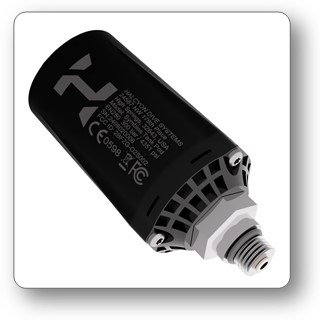
The SYMBIOS TANK POD features a 7/16"-UNF port and can be connected to a high-pressure port of a first-stage scuba pressure regulator. A 19 mm wrench can be used.
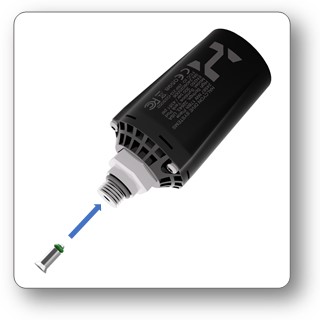
Make sure that the flow restrictor is inserted. In the case of a mechanical pressure sensor failure, the flow restrictor can limit the maximum gas flow through the SYMBIOS TANK POD.
- Use a first stage with two high-pressure ports, so that next to the SYMBIOS TANK POD, a backup SPG can also be connected.
- Installation torque should be hand-tightened; excessive force is not needed.
- To optimize the reliability of the data transmission, install the tank transmitter on the same side where your dive computer is worn.
Activation
As soon as the SYMBIOS TANK POD reads more than 2 bar/29 psi, it will start transmitting tank pressure as well as position data.
- Tank pressure is transmitted approximately every 4 seconds.
- Position data are transmitted in 1-second intervals.
The SYMBIOS TANK POD will automatically switch into standby mode, once the pressure is below 2 bar or if the pressure is constant +-1 bar for approximately 2h.
Pairing
SYMBIOS Tank Pod
- Install the SYMBIOS Tank Pod on a first stage. The SYMBIOS Tank Pod is suitable for tank pressures up to 300 bar.
- Attach the first stage to the tank and open the tank valve.
- Wait approximately 15 seconds for the transmitter to switch on.
- The SYMBIOS Tank Pod and the SYMBIOS dive computer should be in close proximity (ideally <40 cm/16 in).
- Navigate to
➔menu➔SETTINGS➔PAIRING➔TANK POD➔TO GAS - Short-press either button to navigate and select the gas entry that the SYMBIOS Tank Pod should be paired with.
- Long push button A to select a gas entry.
- Long push button A to start pairing.
If the pairing process is successful, the tank pressure will be shown.
If you do not want to pair a Tank Pod to a Gas in the Gas Table, you can also pair it independently of the gas table to T1, T2, T3 or T3:
A SYMBIOS Tank Pod can only be paired with one entry in the menu. It needs to be unpaired before pairing an already paired transmitter with a new gas entry.
Even when using a Symbios Tank Pod Pod, always use a backup tank pressure gauge. Check the backup tank pressure gauge at regular intervals.
SYMBIOS Trim Sensor
The SYMBIOS Tank Pod is equipped with a high-resolution, 3-axis accelerometer, which allows assessment of diver trim. After pairing a SYMBIOS Tank Pod, pair the trim sensor to either a gas entry in the gas table or an entry from the number table.
- Ensure the SYMBIOS Tank Pod is pressurized and transmitting tank pressure data.
- Navigate to
➔menu➔SETTINGS➔PAIRING➔TRIM SENSOR - Press and hold the top button to start pairing.
Battery Replacement
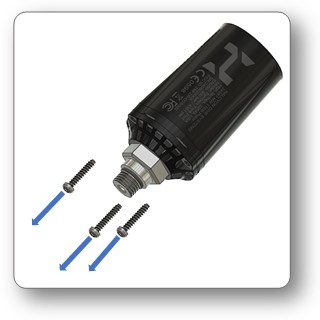
The CR123 battery can be replaced by the user.
- Ensure the SYMBIOS TANK POD is fully depressurized, then disconnect it from the first-stage high-pressure port.
- Remove the three screws with a Torx T10 screwdriver.
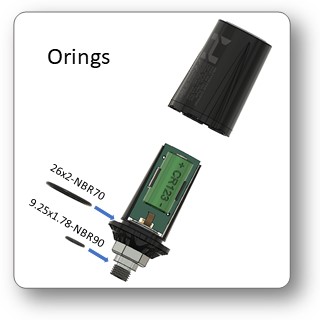

- Replace the battery.
- Ensure the connecting clamps around the battery remain in contact with the battery's ends.
- Inspect the O-ring and replace it if necessary.
- Lightly lubricate a new O-ring with silicon grease.
- Replace the O-ring (26x2 NBR 70) if necessary-
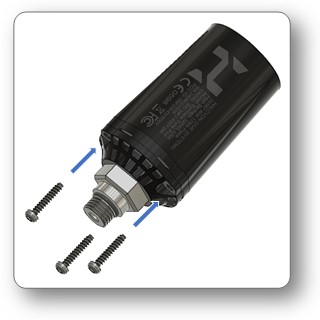
- Install the cap and secure it with the three screws.
En/Disabling the Trim Sensor
Position data transmission can be enabled or disabled. There are several situations where the diver might prefer to have no transmission of position data:
- If one uses the SYMBIOS TANK POD with stage tanks, where position information may not make much sense.
- If the diver uses several wireless devices simultaneously, and wants to reduce data traffic.
- If the diver wants to conserve battery power.
Position data transmission is enabled/disabled by installing the battery in 2 orientations:
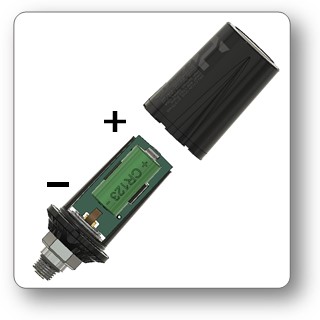
If the negative terminal of the battery is oriented toward the high-pressure port, the position data transmission is enabled.
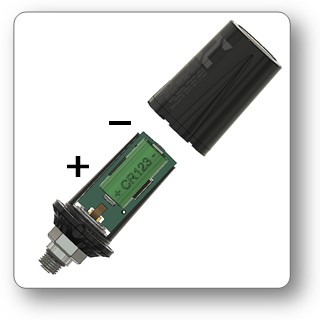
If the positive terminal of the battery is oriented toward the high-pressure port, the position data transmission is disabled.
Trim
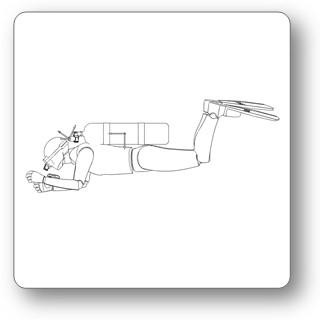
A flat, horizontal position develops less drag while swimming, reducing effort and gas consumption. This position also reduces the risk of damaging fragile corals. The SYMBIOS TANK POD, in combination with a Symbios dive computer, can measure the diver’s tilt or horizontal position in the water. The SYMBIOS TANK POD includes a patented feature that allows divers to receive real-time feedback on their position, allowing them to precisely measure their horizontal position. Information about the diver’s position is available on the CUSTOM FIELDS of the dive computer and displays as a negative or positive percentage from horizontal. To accomplish this, the HALCYON POD includes a 3-axial accelerometer, which allows measurement of the vector of the Earth’s gravity, and from this, calculates the diver's tilt.
- The SYMBIOS TANK POD measures tri-axial acceleration with respect to the spatial orientation of the electronic board of the SYMBIOS TANK POD.
- The information is transmitted to the dive computer.
- The dive computer utilizes a sophisticated mathematical model to calculate the diver’s tilt.
A 2 step calibration is required after pairing the trim sensor and each time the orientation of the SYMBIOS Tank Pod is changed with respect to the tank.
Horizontal Calibration:

- Pressurize the SYMBIOS Tank Pod and lay down the diving tank on its back.
- Navigate to
➔menu➔SETTINGS➔TRIM SENSOR➔HORIZONTAL - Long push button A to perform the horizontal calibration.
Vertical Calibration:
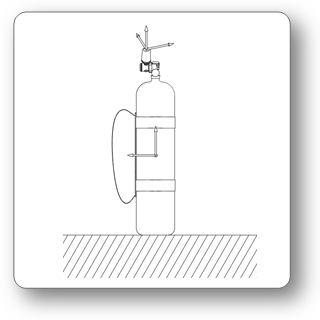
- Orient the tank vertically with the valve up.
- Navigate to
➔menu➔SETTINGS➔TRIM SENSOR➔VERTICAL - Long push button A to perform the vertical calibration.
Care and Maintenance
The SYMBIOS TANK POD is built from high-quality seawater-resistant materials. The SYMBIOS TANK POD is designed to withstand diving in harsh conditions. However, you should still protect your SYMBIOS TANK POD from shock, excessive temperatures, chemicals, and mechanical tampering.
- After diving, rinse the SYMBIOS TANK POD in fresh water to avoid corrosion.
- Protect your SYMBIOS TANK POD during transportation and from mechanical shocks and excessive temperatures.
- Never try to repair the SYMBIOS TANK POD yourself.
- The SYMBIOS TANK POD should be inspected for mechanical damage and cracks before and after each dive to ensure it is working properly.
- Failure to observe the above precautions leads to loss of warranty and any product-related liability of HALCYON DIVE SYSTEMS.
Specifications
This device is recommended for use with compressed air. The compressed air supply must comply with the quality of compressed air specified in the EU standard EN 12021:2014 (requirements for compressed gases for breathing apparatus).
- Maximum operational depth: 100 m
- Rated working pressure: 300 bar/4351 psi
- The air supply shall meet the requirements for breathable air in accordance with EN 12021.
- 3 axial accelerometers, with 1° tilt resolution
- CR123 Li Ion battery
- Housing made from Glass fiber reinforced Polyamide
- Operating temperature: 0 °C to 40 °C (32 °F to 104 °F)
- Storage temperature: -20°C to 50 °C (-4 °F to 122 °F)
- The SYMBIOS TANK POD has a 7/16 ” - 20 UNF thread connection to a first-stage scuba pressure regulator (hex base 19mm).
- When installing the SYMBIOS TANK POD, the recommended maximum torque is 7 Nm.
- The depth of equipment certification, according to EN 250:2014, is 50 m.
- The air supply for equipment compliant with EN 250:2014 shall meet the requirements for breathable air in accordance with EN 12021.
Notice
CE Compliance
- EN 250:2014: The combination of a Halcyon Handset or HUD and the Halcyon Symbios Tank Pod is considered personal protective equipment under Regulation (EU) 2016/425. Polski Rejestr Statków S.A, al. Gen. Józefa Hallera 12680-416 Gdansk, Poland, Notified Body No. 1463 performed EU type-examination (Module B) of the Regulation (EU) 2016/425 Personal Protective Equipment and issued EU type-examination certificate Nr CW/PPER/73/08/2025. The EC Type examination of the SYMBIOS TANK POD, was conducted by Polski Rejestr Statków S.A, al. Gen. Józefa Hallera 12680-416 Gdansk, Poland, Notified Body No. 1463. In this case, the SYMBIOS TANK POD complies with EN250:2014 – respiratory equipment - open-circuit self-contained compressed air diving apparatus – requirements, testing and marking – clause 6.11.1 Pressure Indicator for use with equipment that is compliant with EN12021.The air supply for equipment compliant with EN250:2014 shall meet the requirements for breathable air in accordance with EN 12021. The depth of the equipment certification is 50 m.
- The Halcyon Symbios Handset or Symbios HUD, in combination with the Halcyon Symbios Tank Pod, is subject to the conformity assessment procedure, conformity to type based on the quality assurance of the production process, plus supervised product checks at random intervals (Module D) under surveillance of the Polski Rejestr Statków S.A, al. Gen. Józefa Hallera 12680-416 Gdansk, Poland, Notified Body No. 1463
- Regulation (EU) 2014/53, Radio Equipment Directive
- EN 300 330:2017 V2.1.1 (Radio spectrum), Short Range Devices (SRD); Radio equipment in the frequency range 9 kHz to 25 MHz and inductive loop systems in the frequency range 9 kHz to 30 MHz; Harmonised Standard covering the essential requirements of article 3.2 of Directive 2014/53/EU.
- EN 55032:2015 + A1:2020 + A11:2020 (EMC), Electromagnetic compatibility of multimedia equipment Emission requirements
Identification
The SYMBIOS TANK POD is laser marked with a label containing information about the manufacturer, the model, CE and FCC symbols, and the serial number indicating the manufacturing year and month. The first two digits of the serial number represent the last two digits of the production year.
FCC
This device complies with part 15 of the FCC Rules. Operation is subject to the following two conditions: (1) This device may not cause harmful interference, and (2) this device must accept any interference received, including interference that may cause undesired operation.
Changes or modifications not expressly approved by the party responsible for compliance could void the user’s authority to operate the equipment.
NOTE: This equipment has been tested and found to comply with the limits for a Class B digital device, pursuant to part 15 of the FCC Rules. These limits are designed to provide reasonable protection against harmful interference in a residential installation. This equipment generates, uses, and can radiate radio frequency energy. If not installed and used in accordance with the instructions, it may cause harmful interference to radio communications. However, there is no guarantee that interference will not occur in a particular installation. If this equipment does cause harmful interference to radio or television reception, which can be determined by turning the equipment off and on, the user is encouraged to try to correct the interference by one or more of the following measures: - Reorient or relocate the receiving antenna. - Increase the separation between the equipment and the receiver. - Connect the equipment to an outlet on a circuit different from that to which the receiver is connected. - Consult the dealer or an experienced radio/ TV technician for help.