SYMBIOS TRISENSE ANALYZER Manual
Welcome to the short manual for the SYMBIOS TRISENSE ANALYZER.
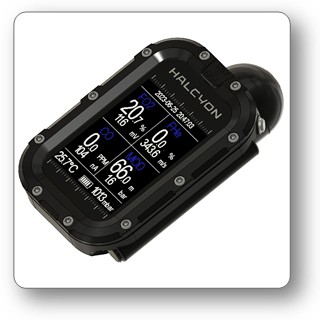
The SYMBIOS TRISENSE ANALYZER is a sophisticated gas analyzer that combines O₂, He, and CO sensing in a compact housing.
USPs:
- Three sensors in a single device: O2, He, and CO
- Direct label printing to a Bluetooth-connected printer
- Industry's smallest housing
- Sunlight-readable transflective display
- IP65-rated enclosure with a sealed electronics compartment for reliable operation in harsh, dusty, and humid environments
- Compatible with both solid-state and galvanic O₂ sensors
- Long-life CO sensor with a service life of up to 5 years
- Non-consuming ultrasonic He sensor with a virtually unlimited service life, requiring no periodic replacement
- Gas flow-independent He measurement for accurate readings under varying flow conditions
Introduction
The SYMBIOS TRISENSE ANALYZER combines advanced gas sensing technologies in an exceptionally compact enclosure that is both waterproof and dustproof, making it suitable for demanding field and diving applications. For oxygen measurement, the analyzer supports both conventional galvanic oxygen sensors and the GREENFLASH solid-state oxygen sensor operating in analog mode via its analog input. Carbon monoxide is measured using a miniaturized solid-polymer amperometric sensor. Since the sensor exhibits cross-sensitivity to both oxygen partial pressure and temperature, the analyzer applies a sophisticated compensation algorithm based on a mathematical model to ensure accurate CO readings over a wide range of gas mixtures. Helium concentration is determined using a non-consuming ultrasonic measurement principle based on the speed of sound. While the speed of sound in air is approximately 345 m/s, it is nearly three times higher in pure helium. The analyzer measures the transit time of an ultrasonic pulse through a precisely defined 100 mm gas chamber. A transmitting piezoelectric transducer generates a short ultrasonic burst, which propagates through the gas before being detected by a receiving piezoelectric transducer. By accurately measuring the time of flight and compensating for temperature, the instrument calculates the speed of sound and derives the helium concentration of the breathing gas. Because the ultrasonic sensing principle is entirely non-consuming and contains no chemically active components, the helium sensor offers virtually unlimited operational lifetime without aging or depletion, eliminating the need for periodic sensor replacement.
Operation
Powering On
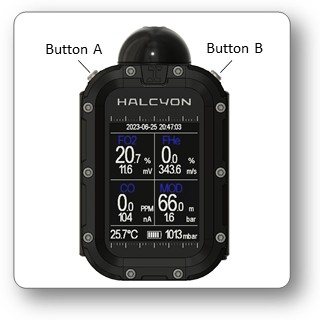
When the SYMBIOS TRISENSE ANALYZER is not in use, it is in standby mode. In standby mode, the display is switched off to minimize power consumption. Press and release button A or button B to activate the computer.
Powering Off
The SYMBIOS TRISENSE ANALYZER will automatically power off and switch into standby mode if it is not operated.
Two-Button Operation
Two tactile push buttons are used to operate the SYMBIOS TRISENSE ANALYZER with short and long pushes of the buttons. Use a short push to navigate in a menu, or increment or decrement user settings. Use a long push to confirm selections, enter the main menu, or activate a user-selectable custom function. Within the menu, the long push functions are indicated in boxes on top and bottom of the screen. Long button pushes have different functions.
Menu Operation
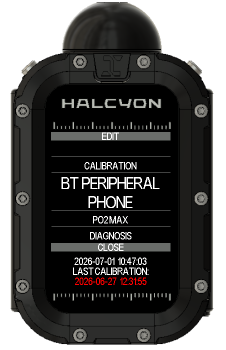
The SYMBIOS TRISENSE ANALYZER has an intuitive menu which allows you to change settings quickly.
- Press and hold button B to print measurement data on a connected lable printer
- Press and hold button A to access the menu.
- Press and release button A or B to navigate in a menu or to increment or decrement a setting.
- Within the menu, the long press functions of both buttons are indicated in boxes on the top and bottom of the menu.
- Press and hold button A to perform the function indicated on top of the menu.
- Press and hold button B to perform the function indicated on the bottom of the menu.
Charging
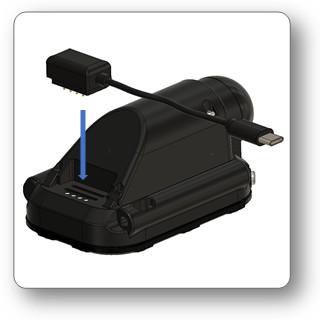
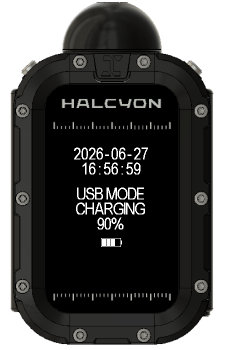
The SYMBIOS TRISENSE ANALYZER features a rechargeable Li Ion battery. A magnetic charging cable conencts the device to a USB charger (5V DC, 1A). When the SYMBIOS TRISENSE ANALYZER is connected to a personal computer or a mobile via USB port, is appears as mass storage device (USB mode). Firmware and language files as well as measurment data can be accessed via USB mode.
Installation of O2 sensor
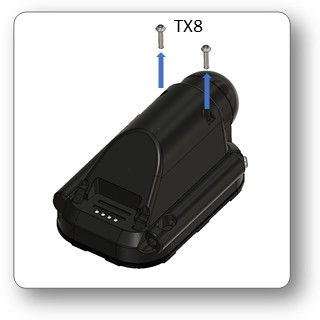
First, remove the 2 screws holding the lid on the back of the SYMBIOS TRISENSE ANALYZER.
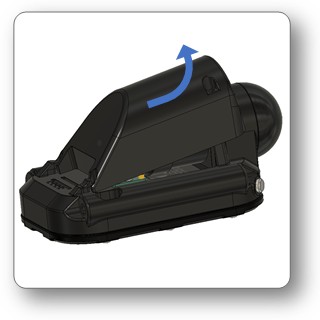
Remove the lid.
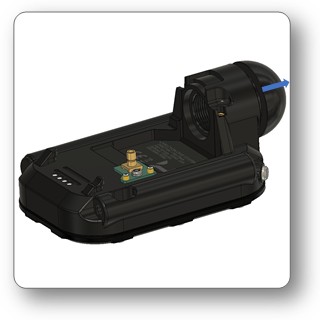
Push the gas connector approximately 5mm forwards to enable easier insertion of a O2 sensor.
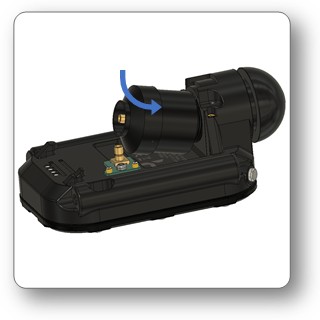
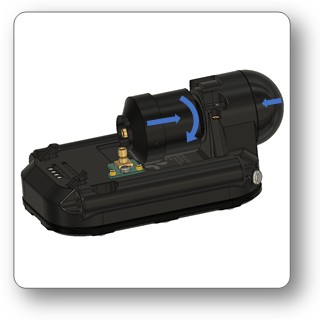
Install an O2 sensor (M16x1mm thread).
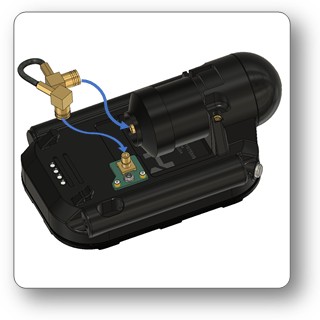
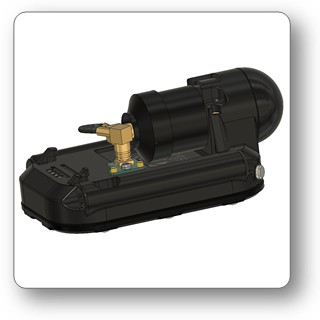
Connect the sensor to the SYMBIOS TRISENSE ANALYZER.
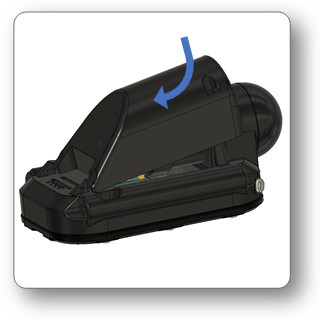
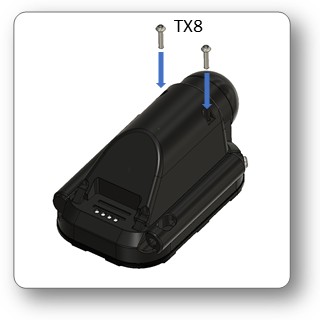
Reinstall the lid and secure it with two screws.
Measurements
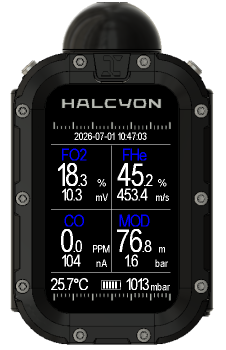
- Slowly open the cylinder valve to establish a low gas flow of less than 5 L/min.
- Hold the analyzer directly against the outlet of the cylinder valve, ensuring that the gas flows into the analyzer inlet.
- Press and hold button B to print the measurements on a lable (requires a compatible BT printer)
In the example, the analyzed gas contains 18% O2, 45% He and 0 pm CO. The output of the analog O2 sensor is 10.3mV. The Speed of sound of the gas mixture is 453.m/s. Ambient temperature is 25.7 °C and the ambient pressure is 1013 mbar. With a max pO2 of 1.6 bar, the MOD of this gas mixture is 76 m.

- Excessive gas flow can increase the pressure at the oxygen sensor, resulting in falsely elevated O₂ readings.
- Excessive gas flow may also damage the analyzer and/or its sensors.
Calibration
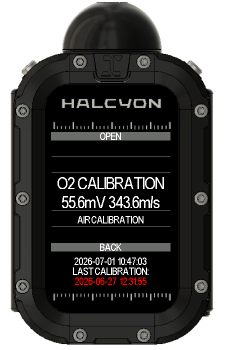
The analyzer must be calibrated before any measurements are performed. The CO sensor has a cross senstivity to O2, therefore a 2 point calibration is required to be able to correct for the cross sensitivity, when gas mixtures with O2 contents different than 21% are used.
Calibration with air:
- Turn on the analyzer
- expose the analyzer to fresh air (CO: 0 ppm)
➔menu➔CALIBRATION➔AIR CALIBRATION➔OPEN
Calibration with O2:
- Turn on the analyzer
- Slowly open a O2 cylinder valve to establish a low gas flow of less than 5 L/min.
- Hold the analyzer directly against the outlet of the cylinder valve, ensuring that the gas flows into the analyzer inlet.
- Let gas flow into the analyzer for approximately 30s
➔menu➔CALIBRATION➔O2 CALIBRATION➔OPEN
- Galvanic oxygen sensors and electrochemical CO sensors may drift over time, causing their output to change. To ensure accurate measurements, perform a single-point calibration at least once every 24 hours, or whenever the ambient conditions (such as temperature, pressure, or humidity) change significantly.
- The current date and time, along with the date and time of the most recent calibration, are displayed at the bottom of the main menu screen. This allows the user to easily verify when the analyzer was last calibrated.
- If the last calibration was performed more than 24 hours ago, the calibration date and time are displayed in red, indicating that recalibration is recommended before performing further measurements.
Menu Tree
CALIBRATION
Calibration menu
CALIBRATION → O2 CALIBRATION
Calibration with O2 and 0 ppm CO.
CALIBRATION → AIR CALIBRATION
Calibration with fresh Air and 0 ppm CO.
BT PERIPHERAL
Can be set to PHONE or to PRINTER.
PO2 MAX
Default value 1.6 bar. This value is used to calculate the MOD.
DIAGNOSIS
This menu screen shows values of the internal sensors.
SYSTEM → BRIGHTNESS
Screen brightness from 1..9. The transflextive screen of the SYMBIOS TRISENSE ANALYZER can also be read in bright sunlight, even with screen brightness set to low values or off.
SYSTEM → TIME
Set Time.
SYSTEM → DATE
Set Date.
SYSTEM → UTC
Set UTS time zone.
SYSTEM → LANGUAGE
ENGLISH / GERMAN / ITALIAN / SPANISH / FRENCH
SYSTEM → STICKER SIZE
Choose the sticker size:
- LARGE: 51x51 mm
- SMALL: 51x25.6 mm
SYSTEM → STICKER LAYOUT
This menu item allows customization of the sticker. Choose the line content for the sticker. The BT app is required to edit custom text.
SYSTEM → STYLE
Choose between classic and modern style.
SYSTEM → SLEEP TIMEOUT
Set the period of inactivity after which the device automatically enters Sleep mode.
SYSTEM → SYSTEM INFO → BT CODE
This code is required for BT pairing with a mobile device.
SYSTEM → SYSTEM INFO → FIRMWARE
Firmware version number.
SYSTEM → SYSTEM INFO → SERIAL NR
Serial number of the device.
Wireless connectivity
The SYMBIOS TRISENSE ANALYZER can be connected either to a mobile device or toe a ZEBRA printer which supports BT LE and CPCL.
Printer support can be enabled in
If Printer support is selected and a compatible and correctly set up printer is in close vicinity, the SYMBIOS TRISENSE ANALYZER will automatically connect to the printer. Then, the printers name is displayed on top of the display.
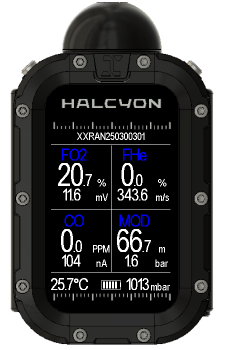
- Press and hold button B to print the currenly displayed measurements.
Preparation of a ZEBRA printer
The analyzer is compatible with BT LE enabled Zebra printers that support the CPCL programming language. For best performance, the Zebra ZQ511 printer is recommended.
To configure the printer for BT LE operation:
- Download and install Zebra Setup Utilities on your computer.
- Connect the Zebra printer to the computer using a USB cable.
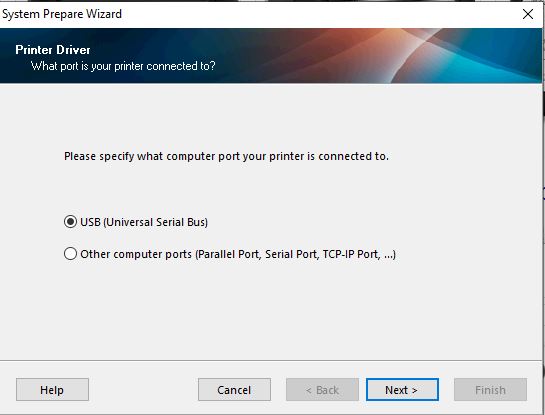
- Launch Zebra Setup Utilities and select USB conection
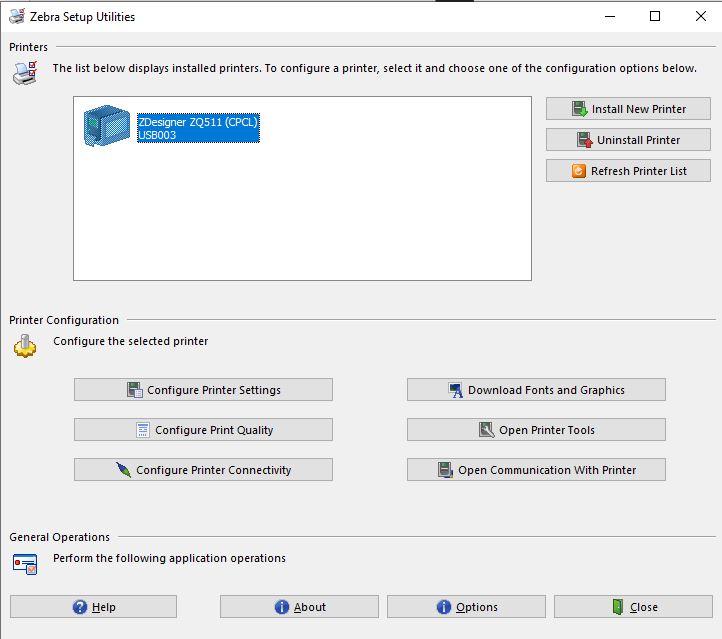
- Select the connected printer from the list and click on Configure Printer Connectivity.
- Select BT
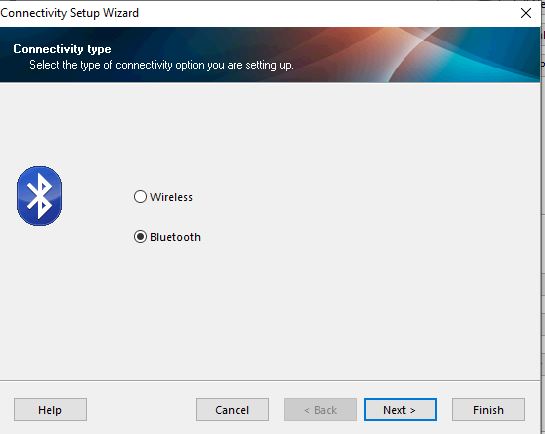
- Select BT Low Energy Only
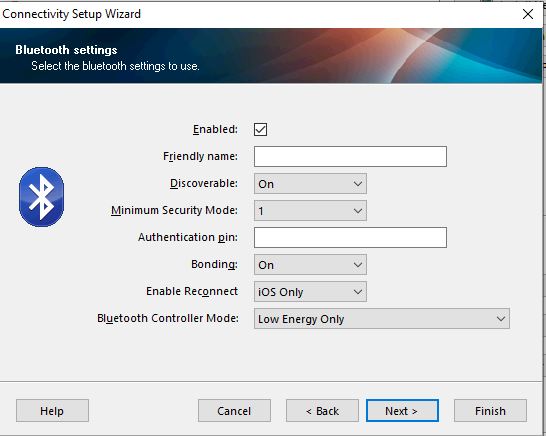
- Select Security and Pairing (leave default settings)
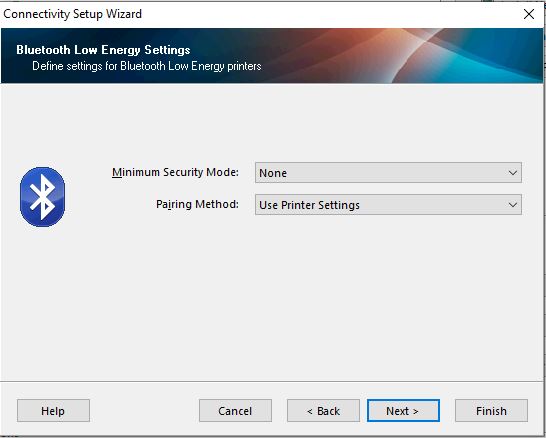
- Send data to the printer and reset
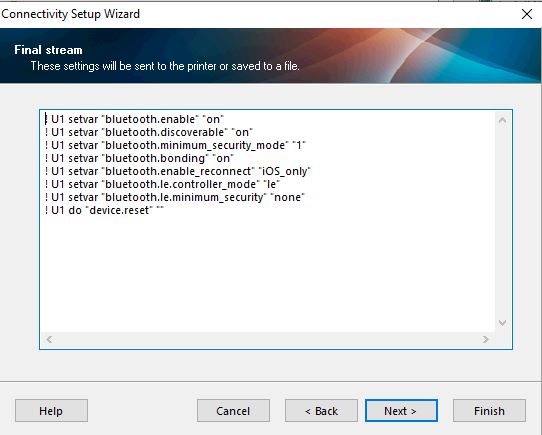
The BT name of the printer should start with XXR, otherwise it cannot be recognized.
Specification
General Specitications:
- Size:
- Weight:
- Rechargeable Li-Ion Battery, 500 mAh
Connectivity
- USB
- BT LE
- Wireless 125 kHz Magnetic Transmission, compatible with Symbios products.
O2 Sensor
- galvanic or GREENFLASH sensor in analog mode
- Output 7-15mV @ 0.21 bar pO2
- Input Impedance: 100 kOhm
- Thread: M16x1mm
CO Sensor
- amperometric solid polymer sensor
- warm-up of 30min is only required, when battery was completely disscharged
- 5 years lifetime
He Sensor
- ultrasonic sensor
- 10 mm effective cavity
- time of flight measurement resolution: 0.1 µs
- non consuming, noperiodic replacement required