Speed Pod
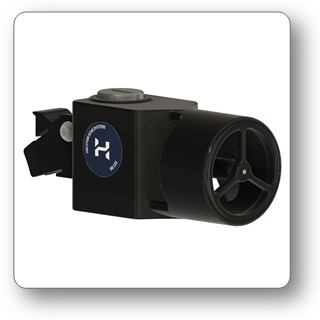
Welcome to the user manual for the Speed Pod.
Key Features
- Speed and distance measurement for diver propulsion vehicles (DPVs)
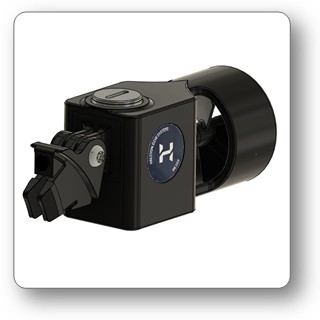
- GoPro-compatible mounting system
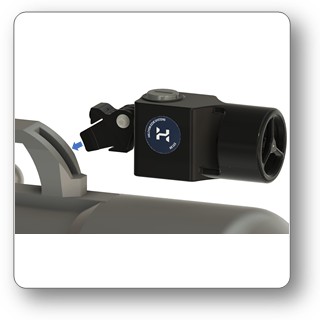
- Snap-in mount for direct installation on the handle of a SUEX Quantum DPV
Operation
The Speed Pod, in combination with a SYMBIOS-compatible dive computer, measures the speed and distance traveled by a DPV.
A small propeller rotates as water flows through the device. The rotations are counted by a built-in microcontroller and transmitted to a SYMBIOS-compatible dive computer via a 125 kHz magnetic transmitter.
The dive computer uses this information to calculate and display speed and distance.
Note: Speed and distance measurement are based on the speed through the water and not over ground.
Turning On
The Speed Pod turns on automatically when the propeller starts rotating.
Turning Off
The Speed Pod automatically enters sleep mode when the propeller remains stationary for an extended period.
Installation
Mount the Speed Pod in a location where it is not exposed to excessive water flow or turbulence generated by the DPV's propeller.
Recommended mounting positions include: - The nose of the DPV - The handle of the DPV - The DPV body, at least 20 cm in front of the propeller shroud
The Speed Pod can be mounted using either a GoPro-compatible mount or the dedicated snap-in mount for the SUEX Quantum DPV.
Pairing
The Speed Pod can be paired with a SYMBIOS-compatible dive computer.
To pair the device, navigate to:
Menu → SETTINGS → PAIRING → SPEED POD
To display speed and distance information, enable the DPV screen under:
Menu → SYSTEM
Maintenance
- Rinse the Speed Pod thoroughly with fresh water after use and allow it to dry.
Cleaning the Propeller
Dirt and iron particles may accumulate in the propeller bearings, increasing friction and potentially slowing down or stopping the propeller.
This can result in inaccurate measurements or no measurements at all.
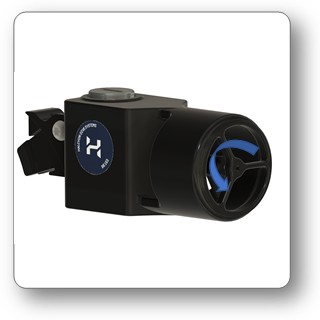
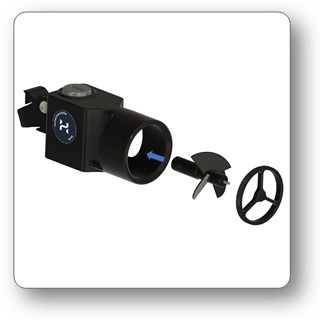
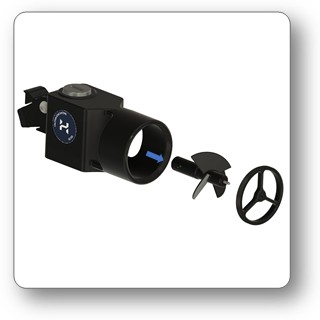
To clean the propeller and its shaft, follow these steps:
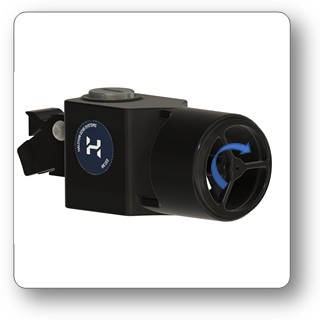
- Unscrew the front propeller support by turning it counterclockwise.
- Remove the propeller assembly.
- Clean the propeller assembly thoroughly.
- Clean the propeller shaft seat.
- Reinstall the propeller assembly.
- Reattach the front propeller support by turning it clockwise.
Replacing the Battery
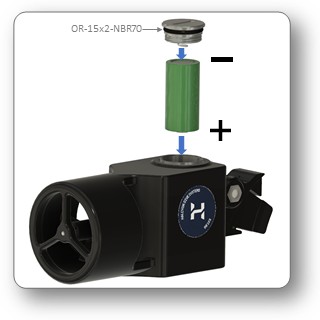
- Open the battery compartment lid.
- Remove the old battery.
- Insert a new CR123 battery with the positive terminal facing down.
- Inspect the O-ring for damage and replace it if necessary.
- Apply a thin layer of suitable O-ring lubricant.
- Reinstall the battery compartment lid, ensuring it is properly secured.
Specifications
- Depth rating: 100 m
- Battery: CR123
- Wireless transmission: 125 kHz magnetic transmitter, SYMBIOS-compatible
- Battery life: Up to 200 hours during diving; more than 1 year in standby mode
- Dimensions: 111 × 53 × 40 mm
- Weight: 190 g