Dive Computer Operation
Two button User Interface
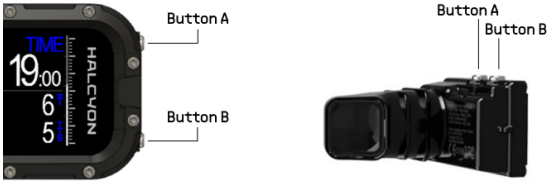
- Press and release button A to switch screens
- Press and release button B to toggle the custom field
- Press and hold button A to enter the menu
- Press and hold button B to execute the custom function
Cancel Warnings & Alarms
- While diving, press and hold both Buttons A and B simultaneously to cancel active warnings or alarms
Custom Function Button
- Press and hold button B can be configured in the SYSTEM → CUSTOM FUNC menu
- in CCR FSP or CCR mode, Button B is automatically assigned to toggle between High Setpoint, Low Setpoint, and Bailout
- in CCR mode and paired with a CCR POD, Button B is automatically assigned to toggle CC mode and OC Bailout
Menu User Interface
- Press and hold button A to enter the menu
One in the menu:
- Press and release button A to navigate up in the menu
- Press and release button B to navigate down in the menu
- Press and hold button A to perform the function indicated in the top row of the screen
- Press and hold button B to perform the function indicated in the bottom row of the screen
Menu Tree
STOP WATCH
Start / reset stopwatch
RESET ø DEPTH
Reset average depth
SELECT GAS
Select active OC or diluent gas. The MOD of the gases in the gas table is based on the SETTINGS → OC PO2 DECO value.
CC BAILOUT
Switch between closed circuit, OC bailout and fixed setpoint (12, 13)
CC BAILOUT → AUTO
Automatic detection of closed circuit or bailout (9)
CC BAILOUT → CC
Closed circuit
CC BAILOUT → BAILOUT
Bailout
CC BAILOUT → FSP HIGH
Fixed setpoint high (9)
CC BAILOUT → FSP LOW
Fixed setpoint low (9)
CCR SETPOINT
Switch between setpoint high and setpoint low (13)
HEADING
Select/deselect/edit a compass heading
WAYPOINT
Select/deselect/edit GPS waypoints
PLANNER
Dive Planner menu (6, 7, 8)
PLANNER → DEPTH
Depth
PLANNER → TIME
Bottom time
PLANNER → RMV
Respiratory Minute Volume
PLANNER → CCR SETPOINT
CCR setpoint
PLANNER → CCR SETPOINT → AUTO
Auto setpoint used in the Symbios rebreather
PLANNER → CCR SETPOINT → 1.2BAR
1.2 bar setpoint
PLANNER → CCR SETPOINT → 1.3BAR
1.3 bar setpoint
PLANNER → CCR SETPOINT → 1.4BAR
1.4 bar setpoint
PLANNER → PLAN
Plan the configured dive
TRAINING
(3)
TRAINING → PROFILE 1
Add 40m/10min to diveprofile
TRAINING → PROFILE 2
Add 60m/10min to diveprofile
TRAINING → PROFILE 3
Add 40m/20min to diveprofile
TRAINING → PROFILE 4
Add 60m/20min to diveprofile
TRAINING → PROFILE 5
Add 40m/30min to diveprofile
TRAINING → PROFILE 6
Add 60m/30min to diveprofile
TRAINING → RESET
Reset added training profiles
SETTINGS
SETTINGS → DIVE MODE
Select a dive mode (16)
SETTINGS → DIVE MODE → OC
Open Circuit Mode, suitable of Air, Nitrox and Mix Gas Diving
SETTINGS → DIVE MODE → CCR
Closed Circuit Rebreather Mode (4, 5, 6, 8)
SETTINGS → DIVE MODE → CCR FSP
Closed Circuit Rebreather Fixed Setpoint Mode
SETTINGS → DIVE MODE → SIDEMOUNT
Sidemount mode, suitable of Air, Nitrox and Mix Gas Diving
SETTINGS → DIVE MODE → BOTTOM TIMER
Bottom timer mode, no decompression calculations are carried out
SETTINGS → EDIT GASES
Edit breathing gases. The MOD of the gases in the gas table is based on the SETTINGS → OC PO2 DECO value.
SETTINGS → EDIT GASES → OC1
Edit, En/Disable or select from Preset: OC gas 1
SETTINGS → EDIT GASES → OC2
Edit, En/Disable or select from Preset: OC gas 2
SETTINGS → EDIT GASES → OC3
Edit, En/Disable or select from Preset: OC gas 3
SETTINGS → EDIT GASES → OC4
Edit, En/Disable or select from Preset: OC gas 4
SETTINGS → EDIT GASES → OC5
Edit, En/Disable or select from Preset: OC gas 5
SETTINGS → EDIT GASES → DIL1
Edit, En/Disable or select from Preset: diluent gas 1 (12, 13)
SETTINGS → EDIT GASES → DIL2
Edit, En/Disable or select from Preset: diluent gas 2 (12, 13)
SETTINGS → EDIT GASES → DIL3
Edit, En/Disable or select from Preset: diluent gas 3 (12, 13)
SETTINGS → GFL/GFH
Edit gradient factor low and high
SETTINGS → OC PO2 DECO
Set max. allowed pO2 for deco calculation in OC mode. The MOD of the gases in the gas table is based on this value. This value is also the basis for gas switch suggestions.
SETTINGS → OC PO2 BOTT
Set max. allowed pO2 for bottom gas in OC mode. Maximum allowed PO2 for MOD calculation of the bottom gas. The bottom gas is defined as the gas with the lowest oxygen fraction within the enabled gases. The High pO2 alarm of the bottom gas is based on this value.
SETTINGS → CCR SETTINGS
CCR settings (12, 13)
SETTINGS → CCR SETTINGS → CCR FSP
Edit setpoint high or low (13)
SETTINGS → CCR SETTINGS → SCRUBBER
Enable / disable scrubber countdown and adjust it
SETTINGS → CCR SETTINGS → SCRUBBER → RESET
Reset scrubber countdown
SETTINGS → CCR SETTINGS → SCRUBBER → SCRUBBER
Enable / disable scrubber countdown
SETTINGS → CCR SETTINGS → SCRUBBER → TIMER MAX
Set max. scrubber duration
SETTINGS → CCR SETTINGS → CC PO2 DECO
Set PO2 source used for the decompression prediction (9)
SETTINGS → CCR SETTINGS → CC PO2 DECO → LOOP
Use loop pO2 to calculate decompression prediction
SETTINGS → CCR SETTINGS → CC PO2 DECO → SETPOINT
Use loop setpoint to calculate decompression prediction
SETTINGS → CCR SETTINGS → FO2 CAL GAS
Set FO2 calibration gas (10)
SETTINGS → CCR SETTINGS → PO2 SENSORS
Enable/disable pO2 sensors (9, 10)
SETTINGS → CCR SETTINGS → CAL CCR
Calibrate CCR pO2 sensors (10)
SETTINGS → PAIRING
Device pairing (1)
SETTINGS → PAIRING → TANK POD
Pair tank pod
SETTINGS → PAIRING → TANK POD → TO GAS
Pair tank POD to gas in gas table
SETTINGS → PAIRING → TANK POD → TO GAS → OC1
Pair tank POD to OC gas 1
SETTINGS → PAIRING → TANK POD → TO GAS → OC2
Pair tank POD to OC gas 2
SETTINGS → PAIRING → TANK POD → TO GAS → OC3
Pair tank POD to OC gas 3
SETTINGS → PAIRING → TANK POD → TO GAS → OC4
Pair tank POD to OC gas 4
SETTINGS → PAIRING → TANK POD → TO GAS → OC5
Pair tank POD to OC gas 5
SETTINGS → PAIRING → TANK POD → TO GAS → DIL1
Pair tank POD to diluent gas 1 (12), 13)
SETTINGS → PAIRING → TANK POD → TO GAS → DIL2
Pair tank POD to diluent gas 2 (12), 13)
SETTINGS → PAIRING → TANK POD → TO GAS → DIL3
Pair tank POD to diluent gas 3 (12), 13)
SETTINGS → PAIRING → TANK POD → TO NUMBER
Pair tank POD to a transmitter number
SETTINGS → PAIRING → TANK POD → TO NUMBER → T1
Pair tank POD to transmitter 1
SETTINGS → PAIRING → TANK POD → TO NUMBER → T2
Pair tank POD to transmitter 2
SETTINGS → PAIRING → TANK POD → TO NUMBER → T3
Pair tank POD to transmitter 3
SETTINGS → PAIRING → TANK POD → TO NUMBER → T4
Pair tank POD to transmitter 4
SETTINGS → PAIRING → TRIM SENSOR
Pair trim sensor
SETTINGS → PAIRING → CCR INTERFACE
Pair CCR (4, 5, 6, 8)
SETTINGS → PAIRING → CCR O2 TANK
Pair O2 (10, 13)
SETTINGS → PAIRING → DPV
Pair DPV
SETTINGS → PAIRING → COMPASS
Pair external compass (5, 8)
SETTINGS → PAIRING → GAS ANALYSER POD
Pair gas analyser pod
SETTINGS → PAIRING → RESET PAIRINGS
Reset all pairings
SETTINGS → TRIM SENSOR
Trim sensor calibration (1)
SETTINGS → TRIM SENSOR → HORIZONTAL
Horizontal calibration
SETTINGS → TRIM SENSOR → VERTICAL
Vertical calibration
TACTICAL
(5), (8)
TACTICAL → SET ALTITUDE
Set altitude
TACTICAL → CAL ALTITUDE
Calibrate altitude
TACTICAL → DISPLAY
Set display colors
TACTICAL → DISPLAY → COLOR
Color Screen
TACTICAL → DISPLAY → RED
Red Screen
TACTICAL → DISPLAY → GREEN
Green Screen
TACTICAL → DISPLAY OFF
Enable / disable display auto off
TACTICAL → DISPLAY OFF TIME
Set display off time
TACTICAL → LOGGING
Enable / disable logging
TACTICAL → BLUETOOTH
Enable / disable bluetooth
TACTICAL → FORMAT SD
Format SD card
LOGBOOK
Display logbook (1) This sub menu contains all previous dives. Each dive can be selected to display dive relevant information including the depth and temperature profile or the pO2 sensor signals in CCR mode.
SYSTEM
SYSTEM → COMP CAL
Compass calibration (1)
SYSTEM → COMP DECLIN
Compass declination (1)
SYSTEM → BRIGHTNESS
Display brightness
SYSTEM → TIME
Edit time (1)
SYSTEM → DATE
Edit date (1)
SYSTEM → UTC
Edit UTC (1)
SYSTEM → SAFETY STOP
Enable/disable safety stop
SYSTEM → LAST STOP
Set last stop on 3msw or 6msw
SYSTEM → AUTO LOCK UI
Automatically lock the user interface when exceeding 100msw
SYSTEM → VIB ALARMS
Enable/disable alarms (6, 7, 8)
SYSTEM → ASC ALARM
Enable/disable ascent speed alarm
SYSTEM → LANGUAGE
Set language
SYSTEM → LANGUAGE → CHINESE
Chinese (17)
SYSTEM → LANGUAGE → ENGLISH
English
SYSTEM → LANGUAGE → GERMAN
German
SYSTEM → LANGUAGE → KOREAN
Korean (17)
SYSTEM → LANGUAGE → ITALIAN
Italian
SYSTEM → LANGUAGE → SPANISH
Spanish
SYSTEM → LANGUAGE → FRENCH
French
SYSTEM → UNITS
Switch between metric and imperial uints (1)
SYSTEM → DENSITY
Switch between salt / fresh water (1)
SYSTEM → STYLE
Display style (1)
SYSTEM → SLEEP TIMEOUT
Set go to standby time (1)
SYSTEM → DIVE TIMEOUT
Set end of dive time (1)
SYSTEM → ORIENTATION
Display orientation
SYSTEM → COMPASS SCALE
Compass scale (scale or digits) (4, 5)
SYSTEM → HUD SIMPLE SCREEN
HUD simple screen layout showing all data in big letters (4, 5) + (1
SYSTEM → WRLSS SCRN
Wireless data screen
SYSTEM → WRLSS SCRN → ALL
Wireless screen shows all wireless data
SYSTEM → WRLSS SCRN → ADDITIONAL
Wireless screen shows only unpaired wireless data
SYSTEM → WRLSS SCRN → OFF
Wireless screen switched off
SYSTEM → GPS SCRN
GPS screen
SYSTEM → DPV SCRN
DPV screen
SYSTEM → BUDDY SCRN
Buddy screen
SYSTEM → DECO SCRN
Deco schedule screen
SYSTEM → DECO LAYOUT
Deco layout (ceiling + time to surface or ceiling + decompression stop duration or all 3)
SYSTEM → GF CHART
Gradient factor chart
SYSTEM → DEPTH CHART
Depth chart
SYSTEM → TRAINING
Enable / Disable training mode as well as the Training sub menu.
SYSTEM → REMOTE
Enable / disables remote access to the dive computer for CCR training purposes (4,5,6,8,18)
SYSTEM → CUSTOM FUNC
Custom functions
SYSTEM → CUSTOM FUNC → BEST GAS
Best gas
SYSTEM → CUSTOM FUNC → STOP WATCH
Stopwatch
SYSTEM → CUSTOM FUNC → HEADING
Save compass heading
SYSTEM → CUSTOM FUNC → OFF
Custom function off
SYSTEM → CF DEFAULT
Set custom field default item
SYSTEM → CF DEFAULT → ACTIVE GAS
Active gas
SYSTEM → CF DEFAULT → T1
T1
SYSTEM → CF DEFAULT → T2
T2
SYSTEM → CF DEFAULT → T3
T3
SYSTEM → CF DEFAULT → T4
T4
SYSTEM → CF DEFAULT → NO DEFAULT
No default
SYSTEM → CF CONTENT
Selectable custom field content
SYSTEM → CF CONTENT → AVERAGE DEPTH
Average depth (11, 12, 13, 14)
SYSTEM → CF CONTENT → BATTERY SOC
Battery state of charge (11, 12, 13, 14)
SYSTEM → CF CONTENT → CNS
CNS (11, 12, 13, 14)
SYSTEM → CF CONTENT → TEMPERATURE
Temperature (11, 12, 13, 14)
SYSTEM → CF CONTENT → ASCENT SPEED
Ascent speed (11, 12, 13, 14)
SYSTEM → CF CONTENT → HEADING
Compass heading (11, 12, 13, 14)
SYSTEM → CF CONTENT → GF NOW
GF now (11, 12, 13, 14)
SYSTEM → CF CONTENT → GF SURFACE
GF surface (11, 12, 13, 14)
SYSTEM → CF CONTENT → GS DENSITY
Gas density (11, 12, 13, 14)
SYSTEM → CF CONTENT → CCR FO2
CCR FO2 (12, 13, 15)
SYSTEM → CF CONTENT → DILUENT PO2
CCR diluent pO2 (12, 13, 15)
SYSTEM → CF CONTENT → CEILING
Ceiling (11, 12, 13, 14)
SYSTEM → CF CONTENT → TTS+5
TTS+5 (11, 12, 13, 14)
SYSTEM → CF CONTENT → LAMP SOC
Lamp state of charge (11, 12, 13, 14)
SYSTEM → CF CONTENT → LAMP RRT
Lamp remaining run time (11, 12, 13, 14)
SYSTEM → CF CONTENT → BUDDY GAS
Buddy gas (11, 12, 13, 14)
SYSTEM → CF CONTENT → TIME
Time (11, 12, 13, 14), 15)
SYSTEM → CF CONTENT → SGC
Surface gas consumption (11, 14)
SYSTEM → CF CONTENT → RGT
Remaining gas consumption (11, 14)
SYSTEM → SYSTEM INFO
System informations (1)
SYSTEM → SYSTEM INFO → SERIAL ID
Device serial number
SYSTEM → SYSTEM INFO → FIRMWARE
Firmware version
SYSTEM → SYSTEM INFO → BUILD DATE
Firmware build date
SYSTEM → SYSTEM INFO → BT CODE
Bluetooth pairing code
SYSTEM → SYSTEM INFO → RESET COMPTS
Reset tissue compartments
SYSTEM → SYSTEM INFO → RESET SETTINGS
Reset dive computer settings
SYSTEM → SYSTEM INFO → RESET SYSTEM
Reset dive computer
SYSTEM → SYSTEM INFO → DIAGNOSIS
Diagnosis screen
SYSTEM → CCR DIAGNOSIS
CCR diagnosis screen (9)
SLEEP
Sleep